
Workforce Intelligence: What It Is and How HR Leaders Use It
by Ryan Stoltz
Last updated
10 min read
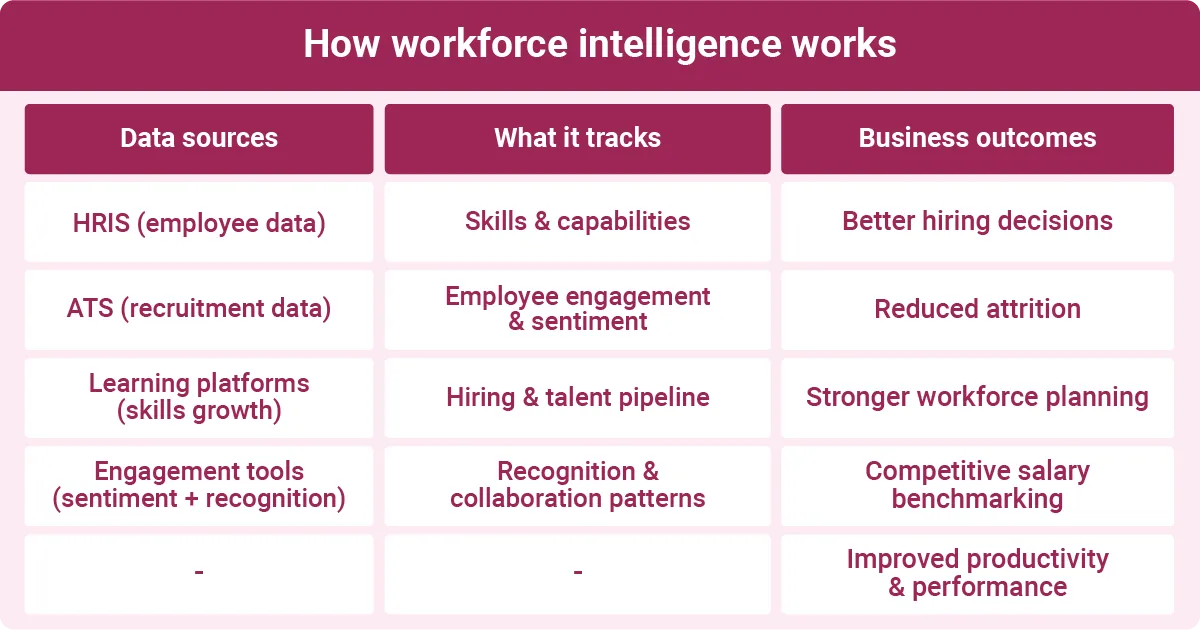
Table of contents
- What is workforce intelligence?
- Workforce intelligence vs. workforce analytics vs. business intelligence
- Benefits of workforce intelligence for HR and the business
- How HR managers can use workforce intelligence
- Challenges and considerations when implementing workforce intelligence tools
- FAQs
Share this article
Human resources leaders have access to ever-growing datasets, but it's not always easy to use that information to make decisions. Workforce intelligence helps them turn seemingly endless data into concrete action.
The sheer volume of information is one of the biggest challenges in HR. Organizations expect leaders to make smart, informed decisions about hiring, compensation, retention, and strategic workforce planning.
With so much information, though, finding the right data points when you need them can be hard. That's especially true when information is scattered across multiple systems or includes data points that haven't been updated since 2020.
Workforce intelligence helps organizations put their data to better use. This guide includes the definition of workforce intelligence and explains how it differs from workforce analytics and people analytics. You'll also learn about its practical benefits and how to start using it in your organization.
What is workforce intelligence?
Workforce intelligence is the practice of using data analytics and artificial intelligence (AI) to analyze employee data. What makes workforce intelligence important is its capability to help HR teams understand their current staff's strengths and needs. It also allows them to predict future business needs, such as skills gaps.
It starts with gathering many types of data. An organization might track everything from attendance to productivity and the number of hours spent on training. They may already collect this information with human resources information systems (HRIS) or use specialized software.
By itself, this data is usually too overwhelming or scattered to offer clear insights. Tools like AI and machine learning (ML) help you bring it all together and spot patterns. For example, you might analyze:
- Available skills data and gaps
- Broader labor market trends
- Employee turnover
- Hiring metrics, such as diversity and time to fill
Workforce intelligence tools go beyond basic reporting by predicting what happens next and making suggestions. If certain departments have higher turnover, the software may recommend creating a new recognition program or raising pay. If your leadership pipeline is empty, it could highlight promising internal candidates.
This technology matters more than ever as organizations increasingly expect HR leaders to make data-driven decisions. It can also help you keep a closer eye on a hybrid workforce and make more competitive offers amid ongoing talent shortages.
The role of AI and machine learning
Machine learning models use algorithms to find patterns in workforce data. One common use is analyzing employee engagement and turnover data to identify employees at risk of leaving. That lets managers step in to offer more support or training opportunities, such as a leadership boot camp. You can also use ML to analyze performance data to find strong candidates for internal promotions.
Key data sources that feed workforce intelligence
Workforce intelligence tools typically draw on multiple tools for in-depth analysis. Organizations often link HRIS, application tracking systems (ATS), learning software, and engagement platforms.
For example, an employee recognition platform allows you to measure your team's achievements and how they celebrate each other. It tracks collaborations, who takes initiative, worker skills, and who gives and receives recognition.
You might use this software to identify employees who have leadership potential or uncover hidden skills needed for new projects. It also measures sentiment. For instance, if your marketing team's engagement drops, infrequent recognition could be the culprit.
The best people analytics software can track the external labor market. Use this workforce intelligence data to monitor hiring and compensation benchmarks. If your competitors tend to pay 10% more, raising salaries could help you attract more talent.
You don't need to track every single metric, though. Focus on these core categories, especially at the beginning:
- Employee turnover patterns
- Hiring metrics
- Labor market trends
- Skills inventory
Workforce intelligence vs. workforce analytics vs. business intelligence
People frequently use terms like "workforce intelligence," "workforce analytics," and "business intelligence" interchangeably. These fields use similar data and tools. However, they have different audiences and support different types of decision-making.
Workforce analytics mostly focuses on describing data and reporting past events. HR teams might use this approach to track retention and see how it has changed over the last five years.
Workforce intelligence often uses the same data sources, but it adds prescriptive and predictive analytics for hr. Instead of simply observing when retention went up, it helps pinpoint the underlying reasons. Perhaps a new flexible work policy improved morale, or a reward program made employees feel valued. It also forecasts how retention could change in the future.
On the other hand, business intelligence is a broader discipline that focuses on enterprise data, such as finances and operations. While it may include people data, it's usually not a main priority.
Understanding the difference between these terms is key when choosing software. Business intelligence tools are often designed for executives and data analysts who need company-wide visibility. They may not track workforce metrics or have steep learning curves for HR teams.
On the other hand, workforce analytics tools are helpful for basic analytics and reporting, but offer limited insights. If you want to predict future workforce trends, consider a workforce intelligence tool like Workhuman®.
Comparison at a glance
Workforce intelligence vs. people analytics
People data analytics is the practice of studying employee data to answer questions. For instance, HR leaders might ask, "Why has morale dipped this quarter?" and "What can we do to fix it?"
By contrast, workforce intelligence is the infrastructure and tools that allow HR teams to analyze data. It also prescribes remedies for common HR problems. This system includes everything from AI to integrated databases.
One standout example is Workhuman iQ. This workforce intelligence software has an AI assistant that uses proprietary algorithms to turn people data into insights called Human Intelligence™. For instance, you could use peer recognition data to analyze your company culture. It also integrates with Workday and other HR systems, making it easier to track skills and program performance.
People analytics and workforce intelligence draw on the same data sources and track similar metrics. However, the latter focuses more on real-time data, along with predictive and prescriptive support for decisions.
Vendors and analysts often use these terms to describe platforms with different capabilities. If you need a tool with predictive modeling and machine learning, a workforce intelligence platform usually checks those boxes.
Benefits of workforce intelligence for HR and the business

Workforce intelligence offers many practical advantages for HR teams and organizations.
One key benefit is that it helps identify skills gaps. According to a 2026 Robert Half surveyOpens in a new tab, only 6% of organizations have the necessary skills to complete high-priority projects. Analyzing recognition data can quickly reveal where teams fall short. For instance, you may realize that only 15% of recognition messages mention collaboration.
Workforce intelligence also makes it easier to connect recognition to retention. Workhuman and Gallup data show that well-recognized employees are 45% less likely to turn over within two years. By tracking retention patterns, you can make sure that recognition is consistent and fair. This analysis might also flag managers who need encouragement to give more praise.
This all adds up to faster and more defensible strategic workforce planning. Identifying skills gaps allows you to hire new talent or train current employees in those areas early. If an upcoming project requires a specific programming language, you might offer to pay for two employees to get certified in it. That's often more affordable than hiring a new programmer.
Likewise, recognition data supports more informed succession planning. Instead of relying on manager recommendations or external recruiters, you can use data to identify high achievers. That leads to more equitable promotion decisions.
Other benefits of workforce intelligence include:
- Better hiring decisions informed by skills- and business outcomes-based data
- Higher productivity
- Improved retention through flagging flight risks early
- More equitable pay and performance practices
- More targeted upskilling and growth opportunities
Above all, workforce intelligence plays a crucial role in allowing HR teams to become strategic business partners, not just administrators. Use these tools to support headcount budgets and workforce decisions with clear data. For example, instead of making an emotional appeal to management for more customer support reps, you can show how they would fill critical skills gaps.
Examples of workforce intelligence in action
Platforms like Workhuman support intelligent workforce decisions in many practical ways.
Human Intelligence uses Social Recognition® data to provide a more complete picture of your team's skills. Use it to identify hidden performers, such as a new hire with a knack for graphic design. It can surface internal candidates as well. If you need to promote someone to a hard-to-fill management role, Human Intelligence can help you find the best fit.
It also tracks how your recognition program affects turnover and engagement. This data helps predict and reduce voluntary turnover, especially in high-risk roles. If 20% of your marketing hires leave within six months, that could be a sign you need to invest more in recognition and onboarding.
More equitable recognition is another useful application. Human Intelligence lets you see the big picture of who gets recognized, so you can address any imbalances early. It also includes an Inclusion Advisor, which provides anti-bias coaching as users write recognition messages.
How HR managers can use workforce intelligence
You don't need to use workforce intelligence for every HR function. That's too overwhelming. Instead, focus on a few areas where this approach has maximum impact.
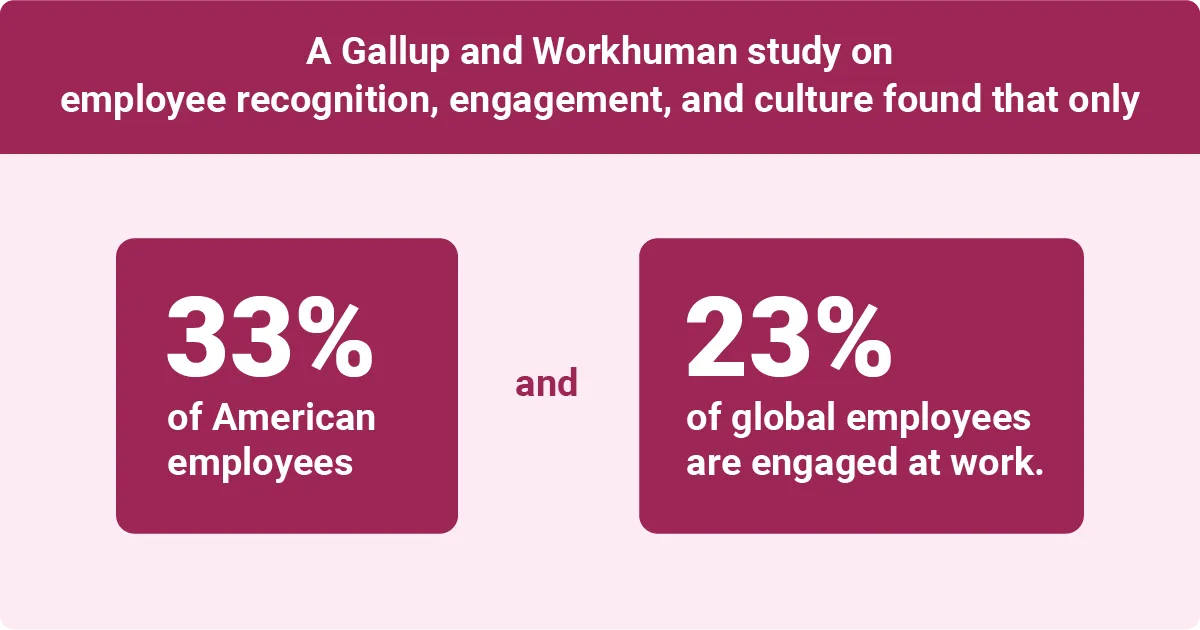
Start by improving company culture. A Gallup and Workhuman study on employee recognition, engagement, and culture found that only 33% of American employees and 23% of global employees are engaged at work. Additionally, over half of global employees are job hunting.
Human Intelligence helps address this issue by analyzing recognition and performance data. It uses this information to track employee skills and measure the impact of HR programs.
Assess this data for patterns, such as behaviors that lead to burnout or resignation. Then encourage managers to intervene early when you spot those trends, so you can re-engage top performers.
Workforce planning is another area where intelligence software makes a difference. Use scenario modeling to see how adding headcount or hiring for certain skills would affect the organization. It also lets you predict the cost of each decision.
Workforce intelligence supports talent management and acquisition, too. See which recruiting platforms provide the most value by tracking quality-of-hire and time-to-productivity. That way, you'll stop wasting money on ineffective job boards.
This technology can promote diversity, equity, and inclusion (DEI) initiatives. Keep a close eye on representation, pay equity, and promotions.
And don't forget about the managers. Empower frontline leaders by building real-time dashboards that they can explore and act on. For example, if they notice that engagement has dropped, they might plan a spontaneous recognition or team-building event.
Getting started: A practical approach
Launching a workforce intelligence program doesn't have to be complicated. These simple steps will help you hit the ground running:
- Start with one or two high-impact business questions, such as "What are the biggest factors affecting turnover?"
- Before you invest in new tools, audit your existing data sources. Note their quality and compatibility.
- Partner with IT and finance to make sure you're tracking the same metrics. You should also ask your tech team for guidance on choosing tools and governance.
- Pilot your new workforce intelligence system with a single function, such as talent acquisition.
- Gradually scale your program to new areas as you gain confidence and knowledge.
Applications for small and mid-sized businesses
You don't need thousands of employees to benefit from workforce intelligence. This approach is just as valuable for smaller HR teams.
Talent acquisition is one area that provides a clear ROI. Use workforce intelligence to track candidate quality and offer acceptance across different platforms. This data will help you quickly identify which job boards lead to the best hires. If LinkedIn only leads to 10% of your hires, you can probably spend less there.
Of course, the last thing you want to do is cancel out those savings by splurging on a pricey, enterprise-level system. Look for talent intelligence tools that match your company size and data maturity.
Key metrics and KPIs to track for actionable insights
Just because a workforce intelligence tool can monitor dozens of data points doesn't mean you need to track them all. Focus on several core areas.
Use these key performance indicators (KPIs) to track retention:
- Attrition risk score
- Regrettable attrition rate
- Tenure curves
To measure the success of talent acquisition, monitor these metrics:
- Quality of hire
- Source effectiveness
- Time-to-productivity
If workforce planning is a priority, keep a close eye on:
- Cost per full-time equivalent
- Internal mobility rate
- Skills coverage
These metrics provide insights into equity:
- Pay equity ratios
- Promotion velocity by demographic
- Representation by level
Challenges and considerations when implementing workforce intelligence tools
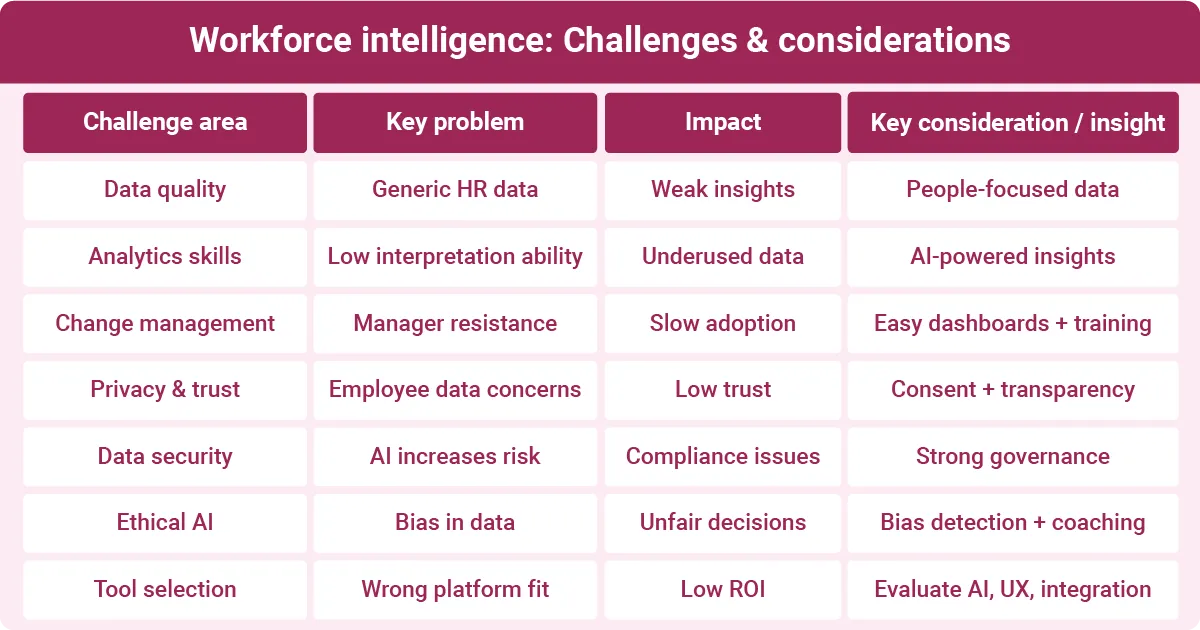
Even the most tech-savvy HR teams often face pitfalls when setting up a workforce intelligence system. Being aware of these issues can help you sidestep them.
Workhuman iQ prioritizes people-specific data instead of standard HR metrics. The AI Assistant can provide deeper insights into company culture and skills. It also makes it easy to integrate multiple sources, breaking up data silos. Investing in this type of specialized software can help you get the most out of workforce intelligence.
A lack of analytical literacy is another common challenge for HR teams. It doesn't matter how much data you gather if no one knows how to interpret it. Choosing an AI-powered tool that uses natural language processing can help bridge skills gaps. Workhuman's AI Assistant answers questions like, "Who are the most recognized employees this month?"
Change management can be tricky, too. Managers may resist new technology, especially if they worry it will add to their workload. Address these concerns by providing training and accessible dashboards.
Ethics, privacy, and trust
Workforce intelligence tools often analyze vast amounts of employee data. Before you start interpreting this sensitive information, be sure to get consent from your team. Clearly explain how you'll use their data to get buy-in.
Prioritize data privacy, too. As per Workhuman’s “4 Pitfalls Preventing Effective AI Adoption,” 80% of data experts agreed that AI is increasing data security challenges. Take the time to vet AI vendors' privacy and security protocols against your internal needs. They should also adhere to relevant regulations, such as the European Union's AI ActOpens in a new tab. When employees trust you'll protect their data, they're more likely to consent.
You should emphasize that you won't use employee data punitively. Transparency builds trust.
Ethical usage is another top consideration. For example, Workhuman's Inclusion Advisor helps detect potential bias in people data. It uses a database built on a recognition language to flag potentially biased phrasing in award messages.
It also provides on-the-spot coaching to help users fix it. In a pilot study, employees changed 75% of the flagged language. This shows how AI features can increase transparency instead of obscuring how organizations use data.
Evaluating workforce intelligence tools and platforms
Not all workforce intelligence tools are created equal. While it's natural to get excited by flashy features, look for a platform that fits your overall HR strategy first.
The category of the tool is the first consideration. Some HRIS have embedded workforce intelligence modules, though they may have limited features. Other options include standalone people analytics suites and AI-first decision platforms like Workhuman.
Here are a few more factors to narrow your options:
- AI and ML capabilities
- Governance features
- Manager usability
- Types and volume of integrated data
- Vendor roadmap
While features matter, be sure to ask vendors for outcomes and case studies of similarly sized businesses. And don't underestimate how much effort it takes to integrate data sources. Look for vendors who offer plenty of assistance and resources.
FAQs
What is workforce intelligence in simple terms?
Workforce intelligence uses AI and data analytics to interpret employee data, such as attendance and recognition messages. It helps organizations see trends and find opportunities to improve their team's engagement and performance.
What does workforce intelligence actually track?
Workforce intelligence tracks employee data across teams and organizations. This includes attendance, engagement, performance, retention, and other core areas.
How is workforce intelligence different from workforce analytics?
Workforce intelligence focuses on analyzing data and using it to make predictions or strategic recommendations. By contrast, workforce analytics simply describes and reports what happened. It all comes down to action and decision-making versus basic analysis.
What role does AI play in workforce intelligence?
Many workforce intelligence platforms use AI to provide deeper, more intuitive analysis. Tools like Workhuman's AI Assistant integrate and interpret thousands of data points quickly. They also use natural language processing to give helpful recommendations that anyone can use.
How can HR managers start using workforce intelligence?
Start small by piloting workforce intelligence software for a single function. For example, you might analyze turnover data and pinpoint potential causes. Then try one or two workforce solutions and track KPIs to monitor their impact.

Ryan Stoltz
Ryan is a search marketing manager and content strategist at Workhuman where he writes on the next evolution of the workplace. Outside of the workplace, he's a diehard 49ers fan, comedy junkie, and has trouble avoiding sweets on a nightly basis.
Recommended for you