
Skills Matrix Explained: How to Map Skills, Close Gaps, and Plan Workforce Development
by Ryan Stoltz
Last updated
11 min read
Table of contents
- What is a skills matrix?
- Benefits and strategic value of skills matrices
- Understanding proficiency scales
- How to create a skills matrix: Step-by-step process
- Using a skills matrix for strategic and workforce planning
- Skills matrix examples across different teams
- Common mistakes and how to avoid them
- Skills matrix software, Excel, and other tools
- Modern and advanced skills matrix approaches
- Skills matrix vs. related frameworks
- FAQs
Share this article
Are you still guessing which team members have the skills to lead your next project? You're not alone. Many HR leaders struggle to keep track of who knows what, especially when they have hundreds of employees.
A skills matrix is a visual tool that maps your people's competencies against the skills your business actually needs, so you can rely on data instead of guesswork. When built and maintained correctly, this tool can reveal gaps before they become bottlenecks and identify expertise hidden in unexpected places.
This guide walks you through what skills matrices are and how to create one that doesn't become yet another unused spreadsheet. It also shares practical tips for using skills matrices for workforce planning and choosing the right software.
What is a skills matrix?
At its core, a skills matrix replaces assumptions with structured data. Instead of relying on job titles or informal knowledge, leaders can see skills distribution at a glance. This makes it easier to identify gaps, uncover underutilized expertise, and allocate people to projects more effectively.
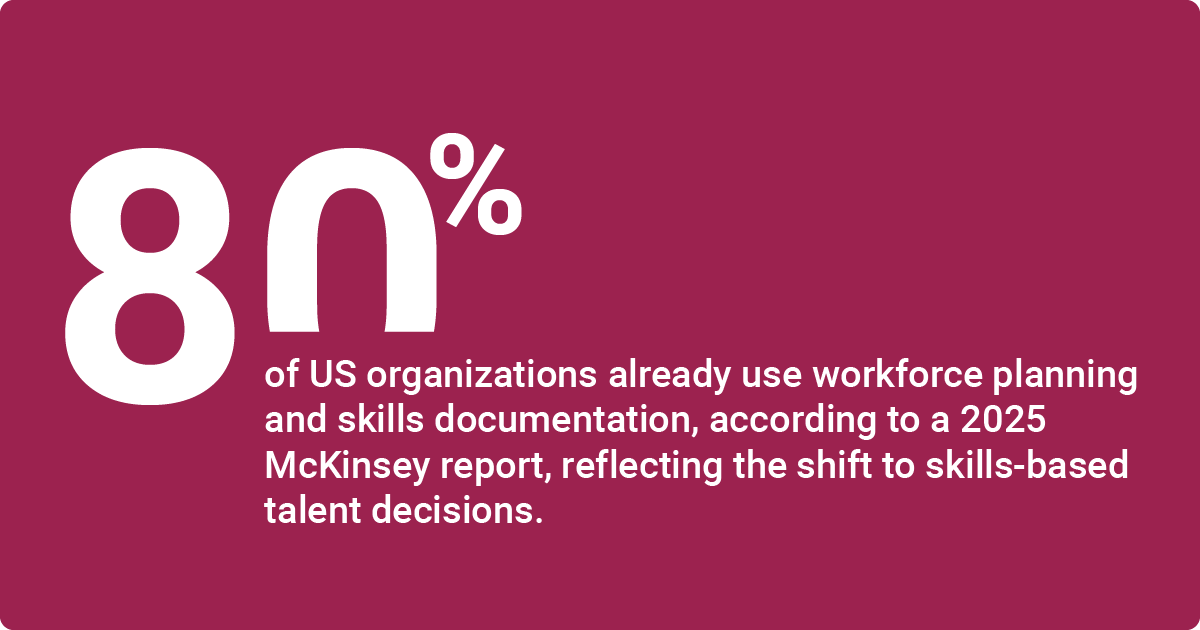
A HR Monitor 2025 reportOpens in a new tab by McKinsey found that 80% of US organizations already use workforce planning and skills documentation, reflecting the shift to skills-based talent decisions.
At a minimum, a skills matrix template includes:
- Defined group of people or roles (rows)
- Curated list of critical skills (columns)
- A shared proficiency scale with clear definitions (for example, 1–4)
- A consistent method for assessing those skills
When combined into a simple visual grid, often supported by color coding, the matrix turns complex capability data into insights leaders can act on quickly.
Unlike job descriptions or org charts, a skills matrix is role-agnostic. It shows capabilities wherever they exist, not just where they’re expected to live on paper.
Core components of a skills matrix
A skills matrix is only as useful as the quality and consistency of the data behind it. While formats can vary, effective matrices share a common set of core components that ensure the insights are accurate, trusted, and actionable.
- People or roles form one axis of the matrix. Depending on the use case, this may include individual employees, job roles, or both. Role-based matrices are often easier to scale, while individual-level matrices support more personalized development and staffing decisions.
- Skills or competencies appear on the opposite axis. These should focus on the capabilities that matter most to current performance and future strategy, including technical, functional, leadership, and collaboration skills. Keeping the list intentionally limited helps maintain accuracy and adoption.
- Proficiency scales define how skills are rated. Whether numeric or descriptive, each level should have clear, observable criteria so that different managers apply ratings consistently. Vague or subjective scales quickly erode confidence in the data.
- Assessment methodology determines how ratings are assigned. Strong matrices rely on a consistent approach, such as a combination of self-assessment, manager review, peer input, or objective evidence like certifications and recent project work. Consistency matters more than perfection; using the same method across teams improves comparability and trust.
- Optional indicators can add depth without clutter. Common examples include employee interest in developing a skill, how recently a skill has been used, or whether someone can mentor others. These signals help distinguish between dormant skills and active capabilities.
- Update cadence and ownership, keep the matrix credible over time. The fast-changing necessary skills may need quarterly refreshes, while more stable capabilities can be reviewed annually. Assigning clear ownership, typically HR in partnership with team leaders, prevents the matrix from becoming outdated or ignored.
Together, these components turn a skills matrix from a static spreadsheet into a reliable decision-making tool that leaders and employees actually use.
Skills matrix vs. competency matrix
Large organizations often use both skills and competency matrices to create effective employee development plans. But these charts measure different things:
| Aspect | Skills Matrix | Competency Matrix |
| What they measure | Discrete, measurable abilities (for example, data analysis, public speaking, CRM usage) | Behaviors and attributes (such as collaboration, confidence, adaptability) |
| Focus | Granular, task-level capabilities | Broader behavioral and value-based expectations |
| Primary purpose | Understanding what people can do today | Understanding how people approach their work |
| Level of detail | Highly specific and role-agnostic | Higher-level and often role-dependent |
| Best used for | Project staffing, skills gap analysis, cross-training, and workforce planning | Leadership development, performance conversations, cultural alignment |
| Typical users | HR, workforce planners, team leads | HR, managers, leadership teams |
| Time horizon | Short- to mid-term capability needs | Long-term development and readiness |
| Relationship to job roles | Shows skills wherever they exist, regardless of title | Often mapped to role expectations or leadership frameworks |
How they work together
Simple skills matrix example (1 = awareness, 4 = can coach others)
Imagine you’re managing a six-person customer support team and want to understand who’s best positioned to help build a new internal knowledge base.
You create a skills matrix with team members listed in rows and the most relevant support skills listed in columns: product knowledge, ticketing system use, written communication, conflict resolution, and upselling.
Each skill is rated on a 1–4 proficiency scale, where:
1 = basic awareness
2 = working knowledge
3 = strong, independent performance
4 = expert who can coach others
Some cells may be marked N/A if a skill isn’t relevant to a specific role.
To make patterns easier to spot, you apply simple color coding. For example, red for low proficiency, yellow for moderate proficiency, and green for high proficiency. At a glance, the matrix highlights strengths, gaps, and risk areas.
You can quickly see who has the strongest written communication skills, where product knowledge is concentrated, and whether any critical skills are held by only one or two people.
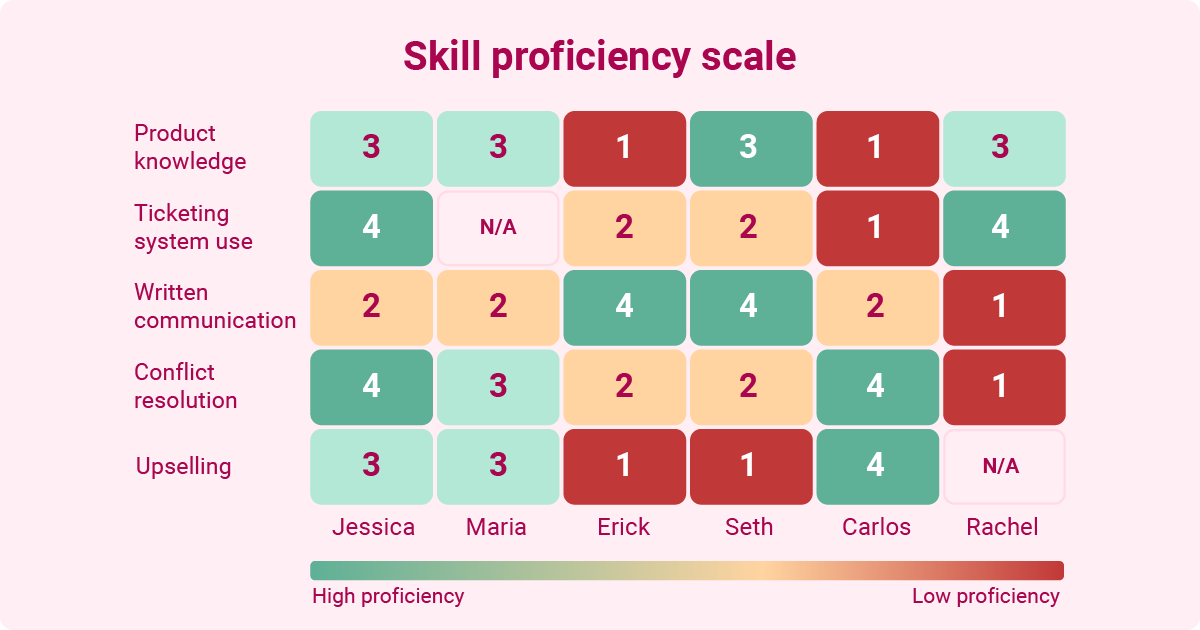
In this example, the matrix helps you identify candidates for cross-training, spot potential single points of failure, and choose the right people for stretch assignments or documentation work. Instead of relying on assumptions or job titles, you’re using shared, visible data to guide decisions.
Benefits and strategic value of skills matrices
Visualizing your team's abilities has many advantages:
- Better resource allocation: Understanding each team member's skill set helps you assign tasks and projects to the right people, boosting productivity.
- Greater objectivity: Even the most impartial managers can unintentionally favor or overlook certain employees. A skills matrix reduces the risk of bias when leaders decide who to promote and pick for development opportunities.
- Improved retention: When companies invest in professional development, employees are twice as likely to stick around. Creating a skills matrix helps you show and guide your team along clear pathways to growth.
- More agility: A Deloitte survey found that skills-based organizations are 57% more likely to anticipate and respond effectively to change.
- More strategic training decisions: Visualizing your company's strengths and weaknesses helps you invest your training resources wisely. If your team lacks communication skills or any other soft skills, you might plan a training boot camp.
- Reduced risk: By spotting and addressing skills gaps early, you'll avoid single points of failure. It's also easier to create succession plans when one person or team isn't hoarding key skills.
- Smarter hiring: According to an ADP survey titled ‘Unveiling the next anythingOpens in a new tab’, 94% of managers say that skills-based hiring predicts on-the-job success better than resumes.
Quantifying skills matrix ROI
One of the clearest signals is cost avoidance. By identifying skills that already exist internally, organizations can reduce external hiring spend, contractor reliance, and redundant training. Even modest improvements in talent mobility management can offset the time and effort required to maintain the matrix.
A skills matrix also improves speed and efficiency. Teams with clear visibility into skills can staff projects faster, shorten time-to-productivity when employees move roles, and respond more quickly to changing priorities. These gains show up in metrics like reduced time to staff initiatives or faster delivery timelines.
Risk reduction is another measurable outcome. Skills matrices surface single points of failure, weak succession coverage, and critical gaps tied to upcoming initiatives. Tracking improvements in bench strength or coverage for key skills provides a concrete way to demonstrate reduced operational risk.
Common proxy metrics include reductions in external hiring costs, faster internal placement for open roles or projects, improved succession readiness, higher post-training proficiency gains, and a streamlined recruitment process. Together, these indicators offer a realistic, business-aligned way to assess the return on skills visibility.
Understanding proficiency scales
Proficiency scales are the foundation of a reliable skills matrix. Without clear definitions and consistent application, ratings become subjective, and comparisons across teams lose credibility.
Employees may have very different skill sets, even within the same department or team. A standardized scale lets you assess everyone's abilities fairly and objectively.
Most organizations use numeric or descriptive scales, typically ranging from three to five levels.
Research on inter-rater reliability consistently shows that shorter scales (three or four levels) lead to more consistent ratings across managers, while longer scales capture nuance but increase disagreement, especially when people fall between two levels. In practice, simplicity often produces more trustworthy data.
The real differentiator isn’t the number of levels, but how well each level is defined. Effective scales anchor proficiency to observable behaviors or outcomes, not personal judgment. For example, “can explain the concept” and “can independently apply the skill in real projects” are far more reliable anchors than labels like “good” or “advanced.”
Governance and calibration matter just as much as scale design. Managers need shared guidance on how to apply ratings, supported by periodic calibration sessions to align expectations and reduce drift over time. Documenting definitions, revisiting them as roles evolve, and reinforcing them during assessment cycles helps maintain consistency.
A well-designed proficiency scale doesn’t aim for perfect precision. Its goal is repeatable, comparable assessments that leaders and employees trust enough to use in planning, development, and staffing decisions.
Choosing the right scale for your organization
The best skills matrix format depends on what you're measuring. For general business skills, such as time management and collaboration, use a four-level scale:
- Unaware
- Beginner
- Competent
- Expert
If evaluating technical or specialized skills, consider adding an "advanced" tier for your highest performers.
Are you already using a performance management system? Design your scale to match your existing ratings, if possible, to avoid confusion. You should also pilot the new system with a few teams to fine-tune your definitions and make sure they're easy to understand.
How to create a skills matrix: Step-by-step process
Step 1: Define the objective
Start by clarifying what you want the matrix to support. Common goals include identifying skills gaps, staffing projects, prioritizing development investments, or strengthening succession plans. A matrix built for “general visibility” rarely delivers value; one built for a specific decision does.
Step 2: Define the scope and participants
Decide which teams, roles, or business units to include. Smaller pilots often work best at first. List the employees or roles that will appear in the matrix and confirm who will be responsible for reviewing and updating the data.
Step 3: Identify critical skills
Focus on the skills that influence current performance and future priorities, not every possible capability. Aim for 10–15 skills required per role or team, balancing technical, functional, and collaboration skills. Validate the list with managers and subject-matter experts to avoid blind spots.
Step 4: Select and define a proficiency scale
Choose a scale that fits your organization, typically three to five levels. Each level should have clear, observable definitions so ratings are applied consistently. Decide whether you’ll track interest in developing a skill separately from proficiency.
Step 5: Choose assessment methods
Determine how skills will be evaluated. Many organizations combine self-assessments with manager reviews, peer input, or objective evidence like certifications or recent project work. Train managers on how to apply ratings and document expectations upfront.
Step 6: Collect the data
Use surveys, manager assessments, or structured workshops to populate the matrix. Capture both current proficiency and, if relevant, employee interest in developing particular skills.
Step 7: Validate and calibrate results
Review ratings with employees to resolve discrepancies and ensure accuracy. Hold calibration sessions across managers to align interpretations of proficiency levels and reduce bias.
Step 8: Visualize the matrix
Present the data in a clear, accessible format—often a spreadsheet or dashboard with filters and color coding. The goal is quick insight, not complexity.
Step 9: Establish ownership and update cadence
Assign clear ownership, typically shared between HR and team leaders. Set a refresh cadence based on skill volatility, such as quarterly for fast-changing skills and annually for more stable ones. Without this step, the matrix quickly loses credibility.
Quick-start option
For a lightweight pilot, list employees, identify 10–15 critical skills, use a simple three- or four-level proficiency scale, and build the matrix in a spreadsheet. Review gaps, validate ratings with the team, and schedule a follow-up update within a few months. This approach lets you test value before scaling.
Using a skills matrix for strategic and workforce planning
Completing a skills matrix may feel satisfying, but it's only useful if you use its data to drive decisions:
For example, AI-powered workforce analytics could evaluate peer recognition patterns and reveal an employee's hidden leadership and project management skills. Based on this, you may prepare them for a management position or move them to another team lacking those abilities.
The latest innovation from Workhuman makes tracking and developing skills a breeze.
Powered by unique data from your recognition program, Workhuman iQ® analyzes text and works with the AI Assistant to:
- surface real-time insights from millions of recognition moments
- develop skill profiles across your organization
- provide guidance to promote skills aligned with your company values
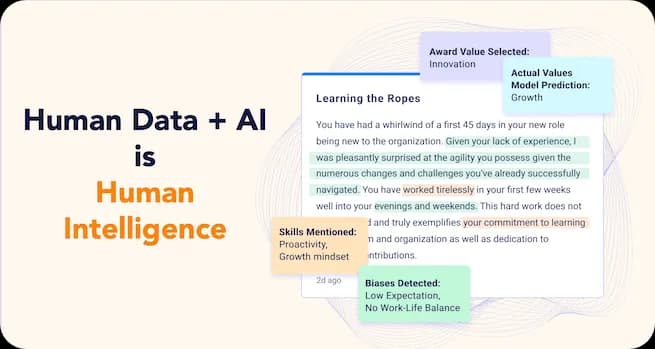
Get previously hidden insights with this first-of-its-kind recognition-specific language model combined with AI.
See everything you can achieve with Workhuman iQ & AI AssistantOpens in a new tab →
Conducting effective skills gap analysis
As you build your matrix, focus on mapping the required skills for upcoming projects or strategic initiatives. Flag any abilities with low proficiency across your team, along with skills that only one or two people have mastered. These skill gaps pose the biggest risk for your organization, so address them first.
Connecting matrix insights to development plans
Here are a few more ways to apply what you've learned from your skills matrix:
- Create tailored individual development plans
- Identify promising employees with adjacent skills for stretch roles
- Match employees with mentors with complementary skill sets
- Use performance metrics to track skill development goals
Skills matrix examples across different teams
While some organizations use universal matrices, others create custom frameworks for each team. Here are a few abilities you may measure for different roles:
| Team | Skills |
| Software development | Programming languages, DevOps tools, frameworks |
| Marketing | Content creation, search engine optimization |
| Customer success | Product knowledge, conflict resolution, and account management |
| HR | Employment law, data analysis, and change management |
| Finance | Accounting software, financial modeling, and auditing |
Adapting the framework for different team sizes
Use these best practices to tweak your matrix based on team size:
- Small teams (5-15): Focus on cross-training and minimizing risk.
- Mid-size teams (15-50): Segment by sub-team or specialty area.
- Large departments (50+): Create role-based matrices with shared core skills.
- Enterprise-wide: Design a standard taxonomy, but let departments customize it.
Common mistakes and how to avoid them
Like every tool, skills matrices come with a few potential pitfalls. These strategies can help you use them effectively.
Ensuring privacy and psychological safety
Win over employees by treating your skills matrix as a development tool that's between them and their manager. Let staff flag skills they want to develop, and don't link their progress to compensation or promotion decisions. Agency is key.
Maintaining accuracy over time
A stale matrix isn't helpful. Combine your skills tracking with your existing HR tools, so you don't need to manually update your chart. You should also make your matrix part of your quarterly or bi-annual review cycle and put one person in charge of updating it per team.
Implementation challenges and mitigation strategies
As you roll out your skills matrix, use these tactics to avoid common roadblocks:
- Clarify how you'll use data to support employees' development, not punish them.
- Explain how this tool will reduce manager workloads by helping them make smarter staffing decisions.
- Focus on measuring skills that you'll use to make decisions, and retire obsolete ones.
- Get executive buy-in from day one.
- Make updates part of your existing routines.
- Start with tangible skills that you can measure with certifications and other evidence.
Skills matrix software, Excel, and other tools
Consider these factors as you research skills matrix platforms.
Spreadsheet skills matrices: When they work and when to upgrade
Many organizations start with Excel and other spreadsheet tools, especially for pilots and simple teams. This has pros and cons:
| Pros | Cons |
| Easy customization | Limited analytics |
| Familiar interface | No access controls |
| Free | No audit trails for compliance |
| Minimal training | Poor mobile experience |
| Work offline | Time-consuming manual updates |
| Version control issues |

While spreadsheets work for basic skills matrices, you'll likely need more sophisticated skills management solutions if skills often change or you need to create multiple team matrices.
Evaluating software solutions
Vendors like Degreed and Gloat offer dedicated skills platforms. Follow these steps as you explore your options:
Modern and advanced skills matrix approaches
Skills requirements change quickly, so don't rely on traditional matrices. Advanced tools often include:
- AI analytics of project deliverables and other evidence
- APIs to embed skills data into other tools
- Dynamic skills taxonomies reflecting current job market data
- Mapping of related skills
- Predictive gap analysis
- Real-time proficiency tracking
Overcoming traditional skills matrix limitations
You may encounter a few barriers with old-fashioned matrices:
- Biased ratings from employees and managers
- Data siloes
- Missing context, such as skills that haven't been used in years
- Stale data
AI-powered platforms overcome these limitations with features like automated data collection and time-decay algorithms.
Skills matrix vs. related frameworks
HR teams often use multiple talent review frameworks, which can create overlap and confusion if their roles aren’t clearly defined. A skills matrix is one of several tools in this ecosystem, and its value becomes clearer when compared to adjacent frameworks.
A skills matrix tracks discrete, observable abilities across individuals or roles, regardless of job title. It answers the question: What skills do we actually have, and where are the gaps? This makes it especially useful for workforce planning, project staffing, and targeted development, acting as a crucial workforce planning solution.
A competency matrix, by contrast, focuses on behaviors and attributes such as collaboration, adaptability, or leadership presence. Competencies describe how work is done rather than what someone can do, and they are commonly tied to organizational values and leadership expectations.
A training matrix documents completed courses, certifications, and compliance requirements. It shows learning activity, not current capability, which means it complements—but does not replace—a skills matrix.
A 9-box grid evaluates employees based on performance and potential. Skills matrix data often feeds into 9-box discussions by providing objective evidence of capability and readiness.
An org chart shows reporting structure, while a skills matrix reveals capability wherever it exists.
When to use each framework
- Skills matrix: workforce planning, gap analysis, cross-training, project staffing
- Competency matrix: leadership development, culture building, hiring for fit
- Training matrix: compliance tracking, certification management
- 9-box grid: succession planning, talent reviews, high-potential identification
Used together, these tools reduce redundancy and support clearer, better-informed talent decisions.
FAQs
What's the difference between a skills matrix and a competency matrix?
A skills matrix tracks specific, measurable skills and proficiency levels by person or role. A competency matrix tracks broader competencies, like behaviors, attributes, and how someone works (for example, collaboration or leadership).
Use a skills matrix to spot skill gaps and plan training; use competencies to guide development and hiring.
How many skills should I include in a skills matrix?
Include 10–15 core skills per role to keep the matrix easy to use and consistent to score. Focus on skills that directly impact performance and staffing decisions, and group them into categories (technical, functional, interpersonal). After testing, add only the skills you’ll actually measure and act on.
How often should a skills matrix be updated?
Update a skills matrix at least quarterly for fast-changing technical skills and annually for interpersonal or leadership skills. Refresh it anytime roles change, new tools roll out, or priorities shift. Tying updates to performance reviews or quarterly check-ins helps keep ratings current and makes gaps easier to address.
Do I need special software for a skills matrix, or can I use Excel?
You can build a skills matrix in Excel or Google Sheets for small teams and simple tracking. Consider dedicated software when you need easier updates at scale, better reporting, permissions, and integrations with HR systems. If maintaining the spreadsheet becomes time-consuming, software is usually worth it.

Ryan Stoltz
Ryan is a search marketing manager and content strategist at Workhuman where he writes on the next evolution of the workplace. Outside of the workplace, he's a diehard 49ers fan, comedy junkie, and has trouble avoiding sweets on a nightly basis.
Recommended for you