
What is a Training Matrix? A Comprehensive Guide for HR Professionals
Last updated
9 min read
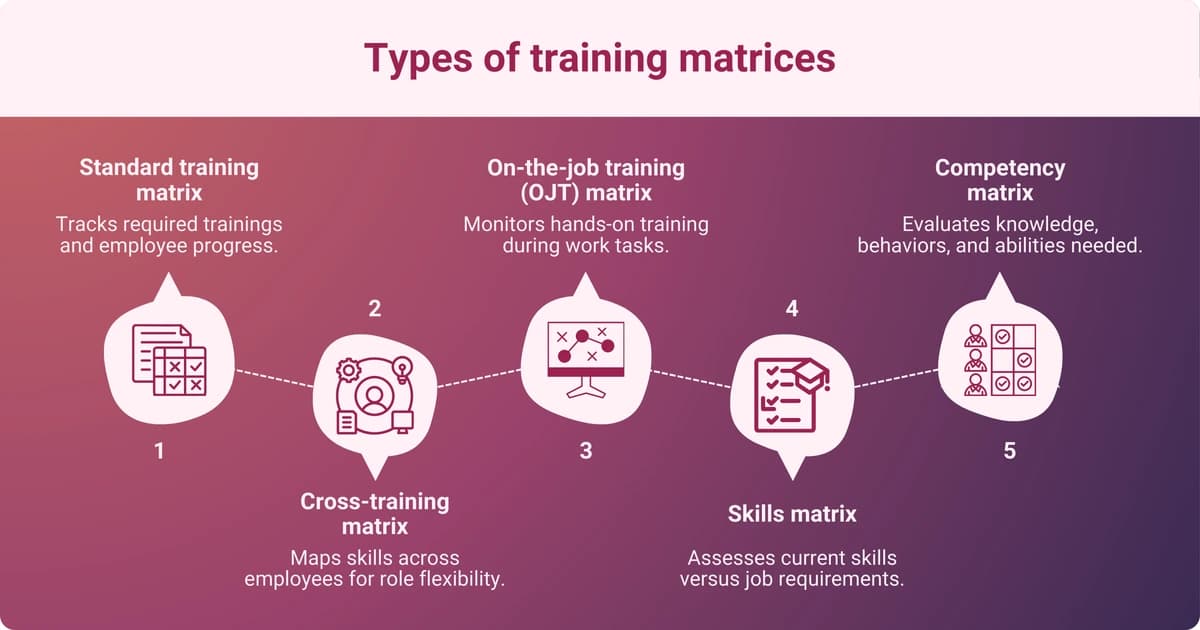
Table of contents
- The evolution of training matrices
- Key components of an effective training matrix
- Benefits of implementing a training matrix
- Different types of training matrices
- Steps to create and implement a training matrix
- Leveraging technology for training matrices
- Case studies: Successful implementation of training matrices
- Challenges and considerations
- Future trends in training matrices
- Summarizing the strategic value of training matrices
Share this article
When used correctly, a training matrix is a valuable tool for employee growth and Human Resource (HR) tracking. Matrices are often used in highly regulated industries to ensure employees are up to date on certification and training and that organizations are compliant.
A matrix is usually a document featuring tables or grids. At its most basic level, one column of the grid lists employee names, while the top row matches training requirements to see which employees are certified or trained and which still need work.
The most obvious benefit of a training matrix is that it helps create more effective, relevant training programs for employees to thrive in a specific organization. A matrix gives a quick view of which employees would need additional training and would benefit from it, laying a solid base for people to thrive.
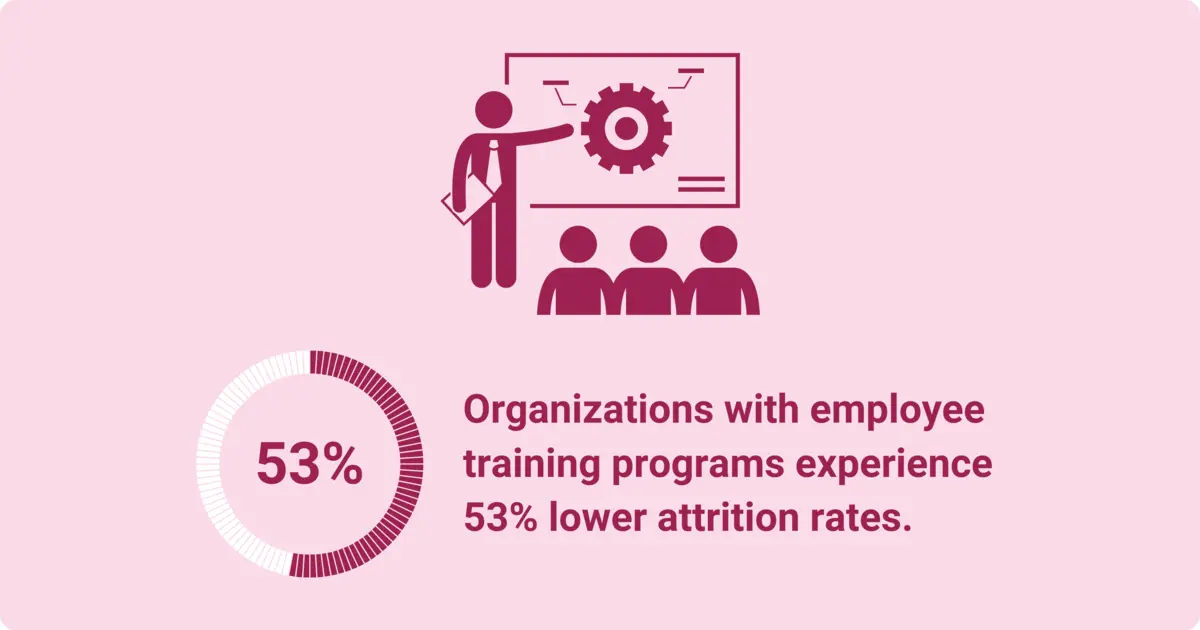
In turn, companies can expect higher satisfaction and engagement levels and lower turnover. According to LinkedIn’s Global Talent TrendsOpens in a new tab, organizations that train their employees through company programs have 53% lower attrition rates.
The evolution of training matrices
From traditional spreadsheets to dynamic tools
In the early 2000s, software like Microsoft Excel brought spreadsheets into the workforce and pleased organized people all over the workforce. The spreadsheets made data analysis and tracking easier by allowing users to sort and organize data based on different values within the table.
Still, spreadsheets offered limited growth opportunities. Because the software was very basic, it was difficult to integrate it with other Learning Management Systems or HR systems.
Integration with skills management systems
As technology has developed over the last 25 years, personalized learning and Artificial Intelligence (AI) have become important parts of the equation. Cloud-based solutions now integrate with skills management systems to provide tracking data to an additional, broader HR management ecosystem for organizations with different locations or remote work. Under the same system, all managers can access the same data quickly.
Key components of an effective training matrix
Every effective training matrix has essential building blocks that create its strong foundation. Three of the most important are discussed below.
Identifying core competencies and skills
Matrices help managers identify the required competencies for various roles and determine the essential skills workers need. As you create your matrix, you choose which skills should be tackled first and which don't require immediate attention.
Mapping training requirements to roles
Every role requires different skills and competencies. For example, a marketing executive doesn’t need to be fluent in web development. A training matrix ensures that the skills employees learn match their job descriptions and duties.
Tracking training completion and proficiency levels
Some organizations use a number system (1-5) to determine competency in certain skills. You can also use color coding, graphs, competency weighting, self-assessment and peer review, development actions, and custom-designed spreadsheets to ensure that training leads to proficiency.
Benefits of implementing a training matrix
Creating a training matrix has many advantages. Consider the following ways in which it can improve your day-to-day operations and benefit your organization.
Enhancing compliance and risk management
Most jobs require safety compliance and risk management training. Systematic tracking ensures your organization adheres to industry standards and that no one slips through the cracks. A training matrix can help mitigate risks in dangerous jobs significantly by notifying managers if employees are behind on regulatory training or skills.
Identifying and bridging skill gaps
Training matrices offer a clear, centralized view of skill gaps. For example, if your team needs specific software skills to work on a project, a matrix shows exactly who needs to be upskilled and how. If some employees don't have customer service training but plan to help out on a busy weekend, it's easy to spot where training needs to occur.
A training matrix also allows for better resource allocation. As you better understand the skill gaps, you can allocate training resources to the right place. For example, only one team member may need software training. Rather than running an entire workshop, you can work with that individual employee to get them up to speed.
Facilitating succession planning and career development
Training matrices also help to identify employees' skills for succession planning and career development. With a matrix, employers have a quick snapshot of employee skills and know what development they need for progression within the organization. If you see one entry-level employee who shows management potential, a matrix helps create a plan to offer mentorship and leadership training.
Different types of training matrices
There are different types of matrices, and their benefits and specifics vary across industries and positions. The following five are most often used.
Standard training matrix
An extremely basic option, a standard training matrix usually includes the following information:
- Employee and role information, including department
- Competencies or skills
- Training status
- Additional information like the training provider, completion date, and certification expiration date
A standard matrix is a basic spreadsheet with pertinent information across the top, with the employee's name in the first column. As you scroll through, it’s easy to see who requires extra training and what skills they don’t have yet.
Cross-training matrix
This type is ideal for cross-training employees across different skills, tasks, or roles. Training them more on critical tasks enhances worker flexibility and reduces dependency on certain employees. With this type of training process, employees can step in during high-demand periods, organizational changes, or employee absences.
The name “cross-training” speaks for itself, as you track training across departments and roles to ensure that there’s no disruption in business.
On-the-job training (OJT) matrix
Skills matrix
A skills matrix not only identifies workers' competencies but also divides them into categories such as advanced, intermediate, expert, and basic. Creating a skills matrix involves defining required skills, finding proficiency levels, assessing employee skills, and filling in the matrix. Once you’ve done that, you have a visual representation of what training is missing within your organization.
Competency matrix
A competency matrix is a powerful visual tool that shows if employees have what they need to perform their roles effectively. Your organization may have role-specific competencies and core competencies, as well as proficiency levels and competency assessments. Once you have a competency matrix, creating a skill development and training plan is easier.
Steps to create and implement a training matrix
If you feel like that’s clear as mud, don’t worry. There’s a step-by-step guide to creating a training matrix that anyone can use.
Identify skill gaps
First, identify skills gaps in your employees. Assess their current capabilities and determine where they need development.
Identify training needs and goals
Employee development should always align with performance gaps and business objectives. Workhuman® research shows that employees who learn and develop on the job are 8.4 times as likely to feel there is a path for them within an organization.
Establish a format for the matrix
To establish a format, flesh out the important information for your matrix. This may be the employee's name and role, competencies you want them to learn, ratings or levels, and a spot for an overall score.
Populate the matrix with relevant data
Once you’ve chosen your format and created your matrix, it’s time to populate the data. Enter employee training records, skill levels, and progress milestones.
Review and finalize the training matrix
Review your data and ensure its accuracy. If necessary, bring in key stakeholders and prepare to roll out your new training program.
Integrate with Learning Management Systems (LMS)
Use technology to streamline reporting, reminders, and updates. A mixture of human influence and AI technology creates an almost foolproof training matrix.
Regularly update and maintain the matrix
A training matrix can’t remain stagnant. It’s ever-changing, with training on new procedures and policies, changes in staff, and evolving job roles. Regularly update and maintain your training matrix so employees know how a training matrix improves their job abilities.
Leveraging technology for training matrices
Dedicated software platforms streamlining data management and offer a long list of benefits:
- Improved consistency and accuracy
- Enhanced reporting and visualization
- Real-time tracking and updates
- Reduced administrative workload
- Greater flexibility and scalability
- Better collaboration and communication
Long story short, the technology does the data work for you and provides information that helps you better train your team.
Benefits of software-based training matrices
Software-based training matrices offer important benefits. They provide real-time progress monitoring and tracking, improve collaboration and accessibility, and enhance regulatory and compliance tracking by providing information accessible to all individuals across the organization.
Features to look for in training matrix software
When searching for a training matrix software, ensure it provides the following:
- A user-friendly experience
- Custom permissions for role-based access control
- Competency levels and custom competency definitions
- Automated alerts and notifications
- Leaders, progress badges, and achievements for employee recognition
- Data and security protection
Case studies: Successful implementation of training matrices
If you still need to be convinced of the benefits of a training matrix within your company, consider these two case studies.
Case Study – Tigo: mobile micro‑learning delivers 66 % sales liftOpens in a new tab
When you think of “employee training,” you might picture outdated e-learning modules or awkward Zoom workshops. But what happens when your workforce is spread across hundreds of locations, always on the move, and nowhere near a desk?
Challenge
Solution
Enter eduMe, a mobile-based microlearning platform built for frontline teams.
Tigo rolled out eduMe to its retail sales network to centralize and streamline training. Key features included:
- Bite-sized lessons that could be completed on mobile devices anytime, anywhere
- Role-based training paths, ensuring associates, supervisors, and managers each had their own track
- Progress tracking and automated reporting for leadership to monitor skill development and completion rates
- Drastically reduced onboarding time, dropping from six weeks to just one
In other words, they built a training matrix that was accessible, flexible, and actually used.
Results
The outcome?
- 66% sales increase within 3 months
- 83% reduction in training time (6 weeks → 1 week)
- Thousands saved on travel and materials
- Consistent customer service across stores
That’s what we like to call a win-win-win-win.
If you map each store role to a training matrix and deliver it through a centralized platform, you get performance lift and consistency - just like Tigo did.
Case study – 2020 Companies: Role-Based training that drove a 258% sales surgeOpens in a new tab
When it comes to scaling training across retail environments, most companies think in terms of product knowledge or onboarding checklists. But 2020 Companies took it a step further, combining structured, role-based training with field-level advocacy to drive real revenue growth.
And the results? Nothing short of explosive.
Challenge
2020 Companies was tapped to lead a brand ambassador initiative across five top U.S. military bases. The goal: increase sell-through for a key product line. But they faced a common challenge - no clear training structure, no consistent coverage across locations, and minimal alignment between training, staffing, and sales.
Each location had different expectations, resources, and readiness. Training was reactive. Roles weren’t clearly defined. And the sales numbers reflected it.
Solution
Instead of deploying generic materials, 2020 Companies built a structured, role-based training and advocacy program from the ground up. Key moves:
- Role clarity: Defined specific roles for brand ambassadors, field leaders, and support staff
- Training alignment: Delivered tailored training modules for each role, tied directly to in-store execution and advocacy
- Rapid rollout: Launched the program in under 45 days after initial planning
- Field feedback loop: Used mystery shop data and analytics to fine-tune training needs
- Retention focus: Baked in mentorship and professional development to keep ambassadors engaged and growing
In essence, they didn’t just “train people.” They mapped every role to a set of skills, responsibilities, and training content - a living, breathing training matrix.
Results
- 258% sales increase across the pilot bases in just two quarters
- 45,000+ customers trained through in-store advocacy and live demos
- 93% ambassador retention rate, thanks to development pathways and support
- 14.2 days average time-to-fill for new territory coverage (down from weeks)
That’s what happens when training is treated as a growth lever, not a checkbox.
When roles are clearly defined and mapped to training, teams perform better, faster - and stay longer.
In your own training matrix, consider adding not just the "what" (modules, timelines), but also the "who" and "why". What’s each role accountable for, and how does training support retention, advocacy, and sales?
Challenges and considerations
The challenges that come with implementing a training matrix are similar to any new tool introduced into the workforce. Concerns about data overload, data privacy and security, and resistance to change are mountains you may have to climb to get everyone on board.
Ensuring data accuracy and consistency
Software is only as effective as the data entered, so there is room for human error. Inaccurate data leads to compliance issues, missed training requirements, and poor decisions at all levels of your organization.
Balancing flexibility with standardization
Combining consistency with flexibility can be difficult. Software relies on consistency, while humans want flexibility. Too much data standardization can stifle creativity, while a flexible matrix model can make it more challenging to track training progress.
Future trends in training matrices
What does the future look like for training matrices as technology evolves? How does AI play a role in training, even as organizations recognize the human value of their employees?
Integration with artificial intelligence and predictive analytics
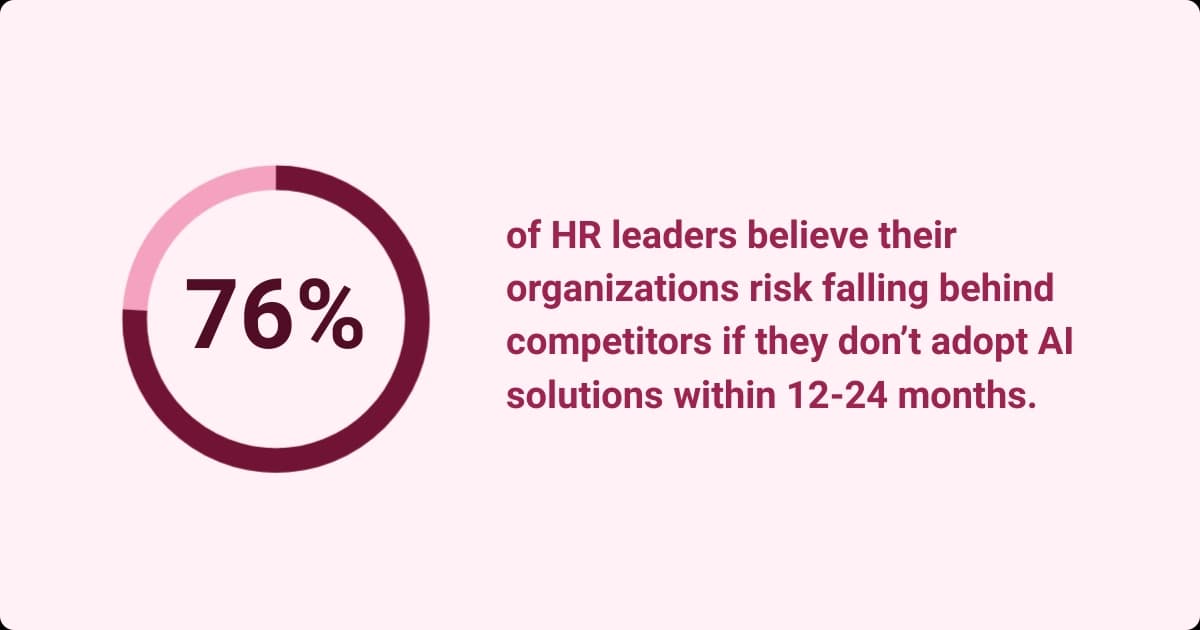
According to a Gallup study cited by Workhuman, 72% of chief human resource officers predicted that AI would replace their roles within three years. Additionally, 76% of HR leaders believe that within the next 1-2 years, they will fall behind companies that adopt AI solutions into their everyday work models.
Those who are upskilled with AI in their current organization are:
- Two times more likely to recommend their company to others
- Five times more likely to see a path to growth in their organization
- 1.5 times more likely to have stronger psychological safety.
Upskilling with AI is vital to productivity, employee mental health, and employee retention. On the other hand, integrating predictive analytics and artificial intelligence may create ethical problems, organizational issues, and technical limitations.
To avoid these problems or at least minimize them, organizations should focus on proper data collection, governing processes, and cleansing the AI data to be representative, reliable, and accurate.
Strict data privacy regulations are important. Training for employees and managers, as well as clear communication, are both important steps in overcoming these challenges. AI models should regularly be audited to check for bias and ensure that the data is representative and diverse.
Emphasis on soft skills and competency mapping
Soft skills are often emphasized in training matrices and competency mapping. However, it’s difficult to quantify soft skills, and some competencies can’t be measured. This leads to a lack of consistency in evaluation and a potential emphasis on soft skills over hard qualifications.
To avoid difficulty measuring soft skills, develop 360-degree feedback from subordinates, managers, and peers and set clear behavioral indicators. Create standardized assessment frameworks or standardized rubrics, then train managers how to objectively assess soft skills.
Take a balanced approach to soft and hard skills. Both are integral to success, but each skill type should be weighed appropriately to avoid overemphasizing soft skills.
Summarizing the strategic value of training matrices
A training matrix can benefit organizations that rely heavily on compliance and regulation or operate across different locations and platforms. Even the smallest organization can upskill employees with a training matrix to achieve excellence in training, competency, and support continuous professional development.
When you use data-driven solutions like training matrices, they improve talent management, increase employee organization and efficiency, create ideas for employee development, allow for seamless succession planning, increase risk management and compliance, and foster a culture where employees want to learn.
Implement a training matrix and continue professional development training to stay ahead of the game. Tailor training matrices to your organizational context and see how quickly you can gain an overarching view of how to help your team members succeed.

Workhuman Editorial Team
More by Workhuman Editorial TeamRecommended for you